The Endcrawl alternative built for collaboration
End credits are a team job. Department heads know their crew, coordinators chase the spellings, producers, lawyers and distributors have to sign off. Endcrawl gives your team a shared Google Doc to edit. EndCredits.pro gives you the workflow around it: ask each department for its names, have every name checked, approve in phases and comment on the exact line, all in the same place where you design and render the credits.
The video loads from YouTube when you press play. Watch it on YouTube.
What is Endcrawl?
Endcrawl is an online service, run by the US company Autoglyph LLC, that turns a list of credits into end credits for film and TV: scrolling credits, end cards and main titles, rendered in the cloud. The credits are written in a Google Doc that is synced with Endcrawl's web app, where you adjust columns, fonts and logos and request renders.
It is paid per production, with a free demo for trying it out. Its team imports your Excel or Word credits during setup, and preview renders let you check changes before the full-resolution render. What it does not cover is the work before the document is final: asking each department for its names, checking them and getting them signed off.
How EndCredits.pro is better than Endcrawl
Most credit mistakes are not design problems. They are a name spelled wrong, a crew member nobody added, a contract credit nobody checked. EndCredits.pro gets the list in, then puts the people who know the answers to work on it, while they are still on the production.
Import the list in any shape
Crew names arrive in emails, spreadsheets, Word documents and old credits. Paste or upload them as they are, in any structure: Excel, Word, CSV, text from an email, or a video of existing credits. AI sorts every line into cast, crew, music and text, grouped by department, and you review it before anything is added.
How importing works →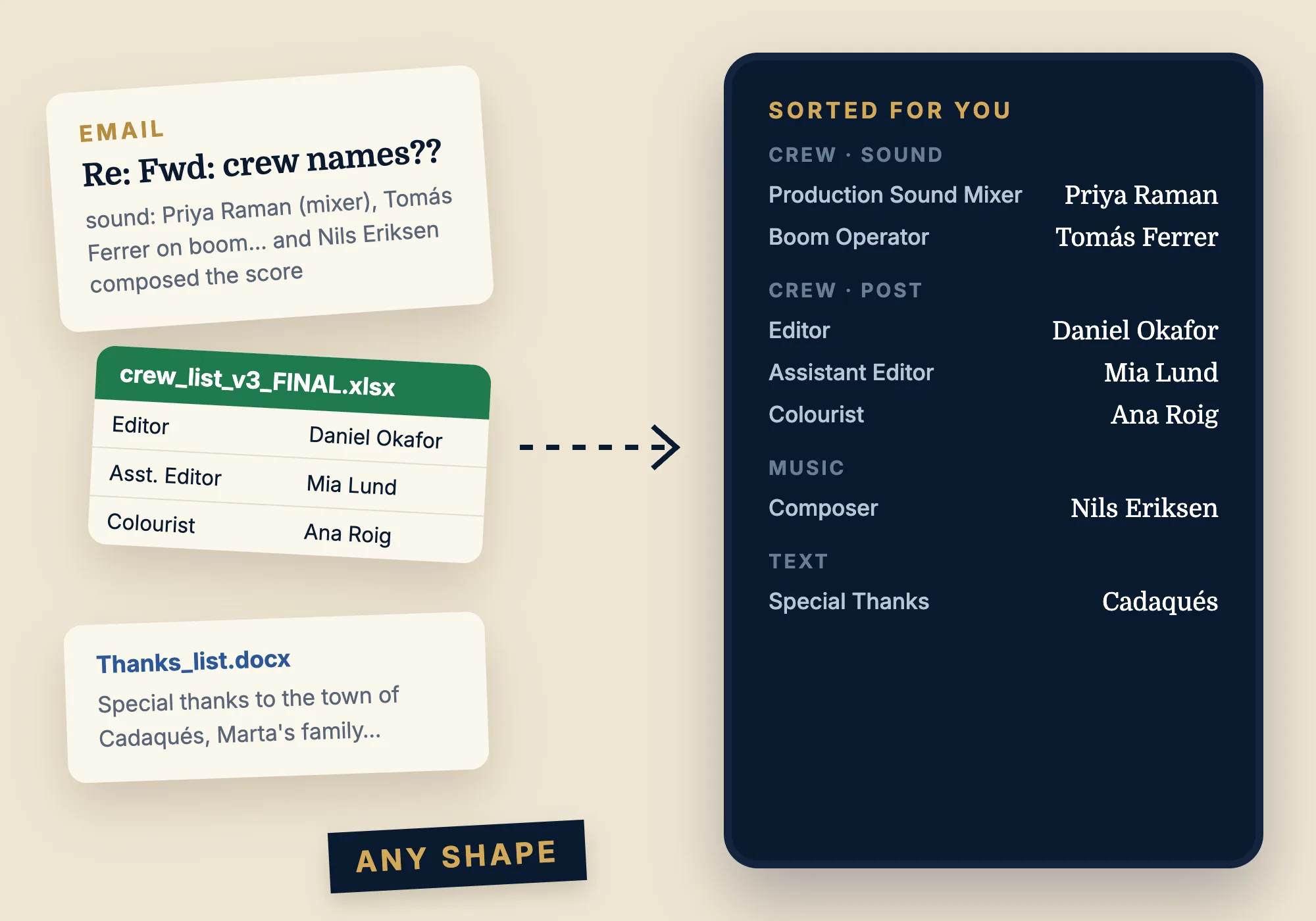
Each department fills in its own crew
The people who know a department best are the ones who should write it down. Send one group of the credits, say the Art department, to its head by email. They add their crew on a private page, with no account. Lock the lines that are already final, and accept or decline what they send.
How department requests work →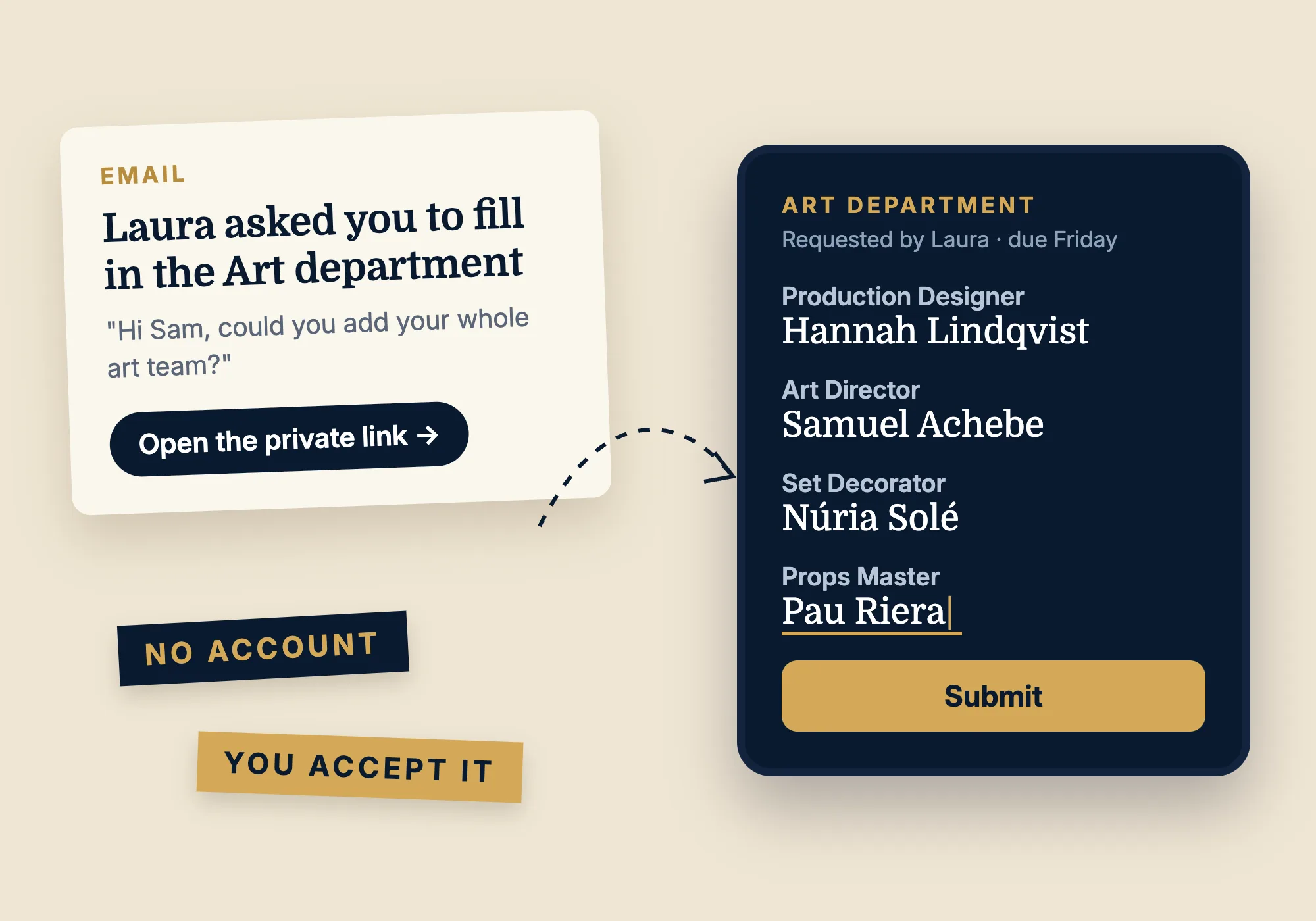
Every name checked before it goes on screen
A misspelled name in the credits is the mistake people remember. Send a review request to someone who knows the crew: they mark each line Verified, or flag it with a note like "It's Jonas Bekker, with two Ks". You see who verified each name, and when.
How name reviews work →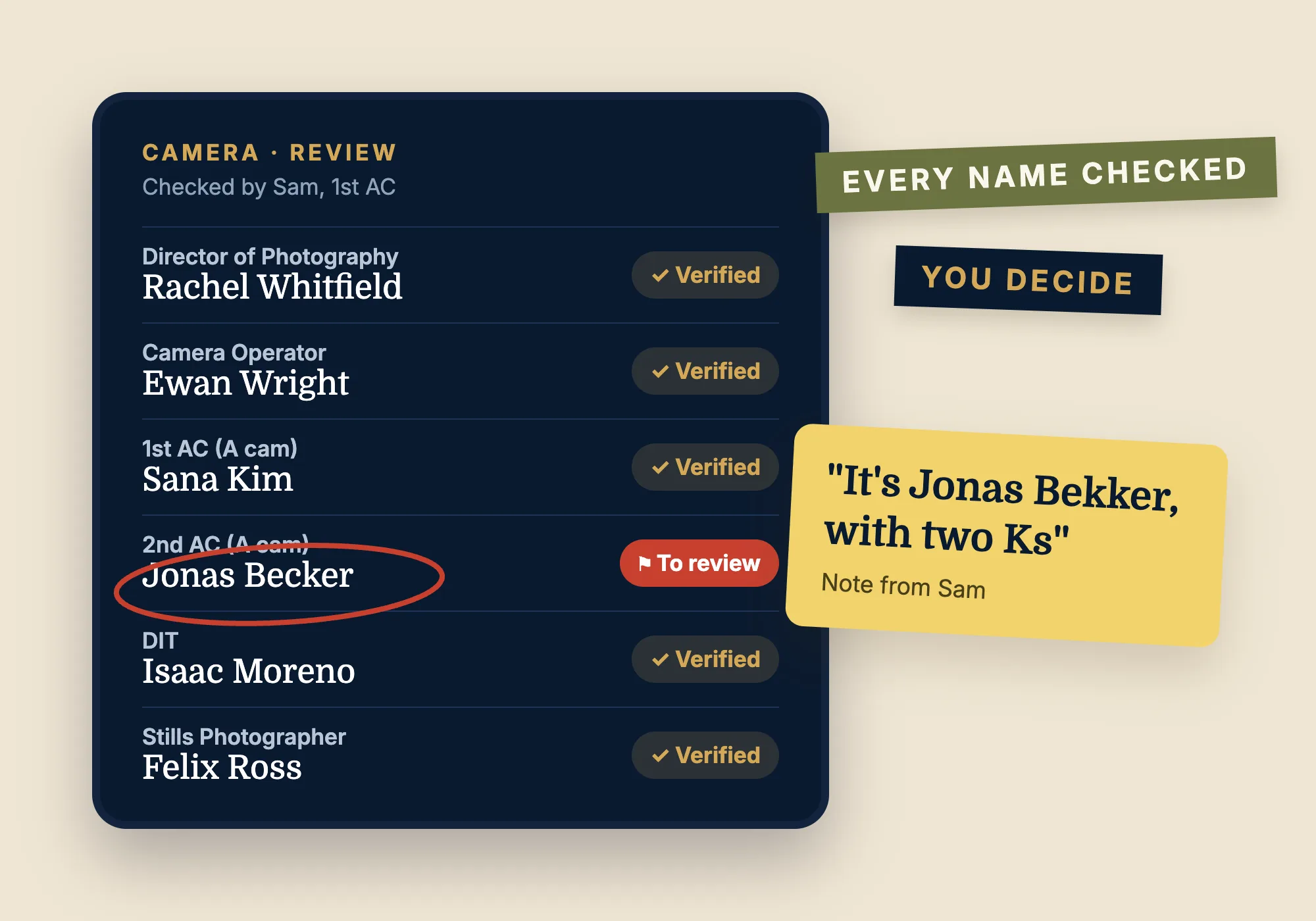
Sign-off in phases, not in email threads
Set up the phases your production needs: producers, then legal, then the distributor. When you submit, the credits are locked and a version is saved. Each approver watches the credits play, comments and approves or rejects, and the next phase starts on its own.
How sign-off works →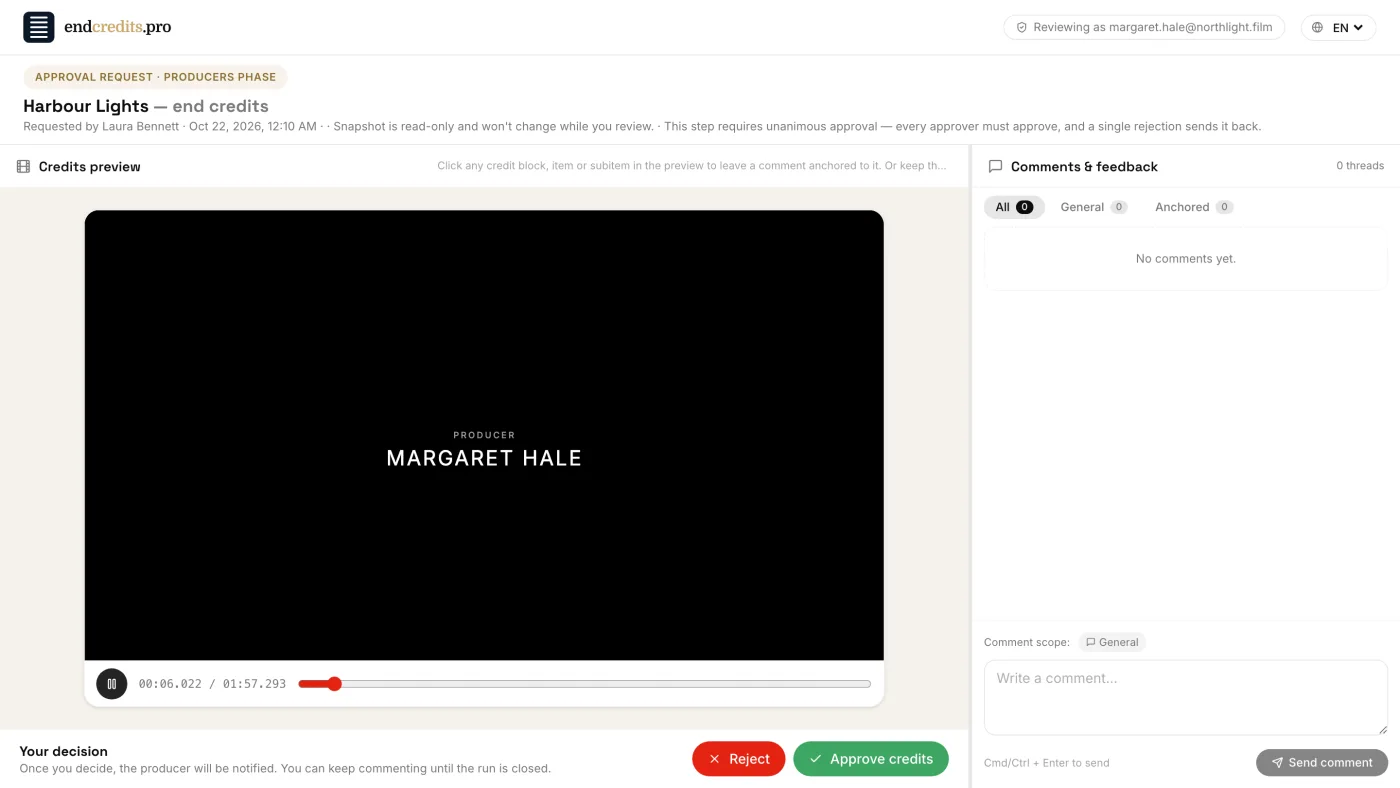
Every change, and who made it
With many hands on the credits, you need to know what changed. The History shows who did what and when; save versions at key moments, compare any of them with today's credits and restore one if something went wrong.
How History works →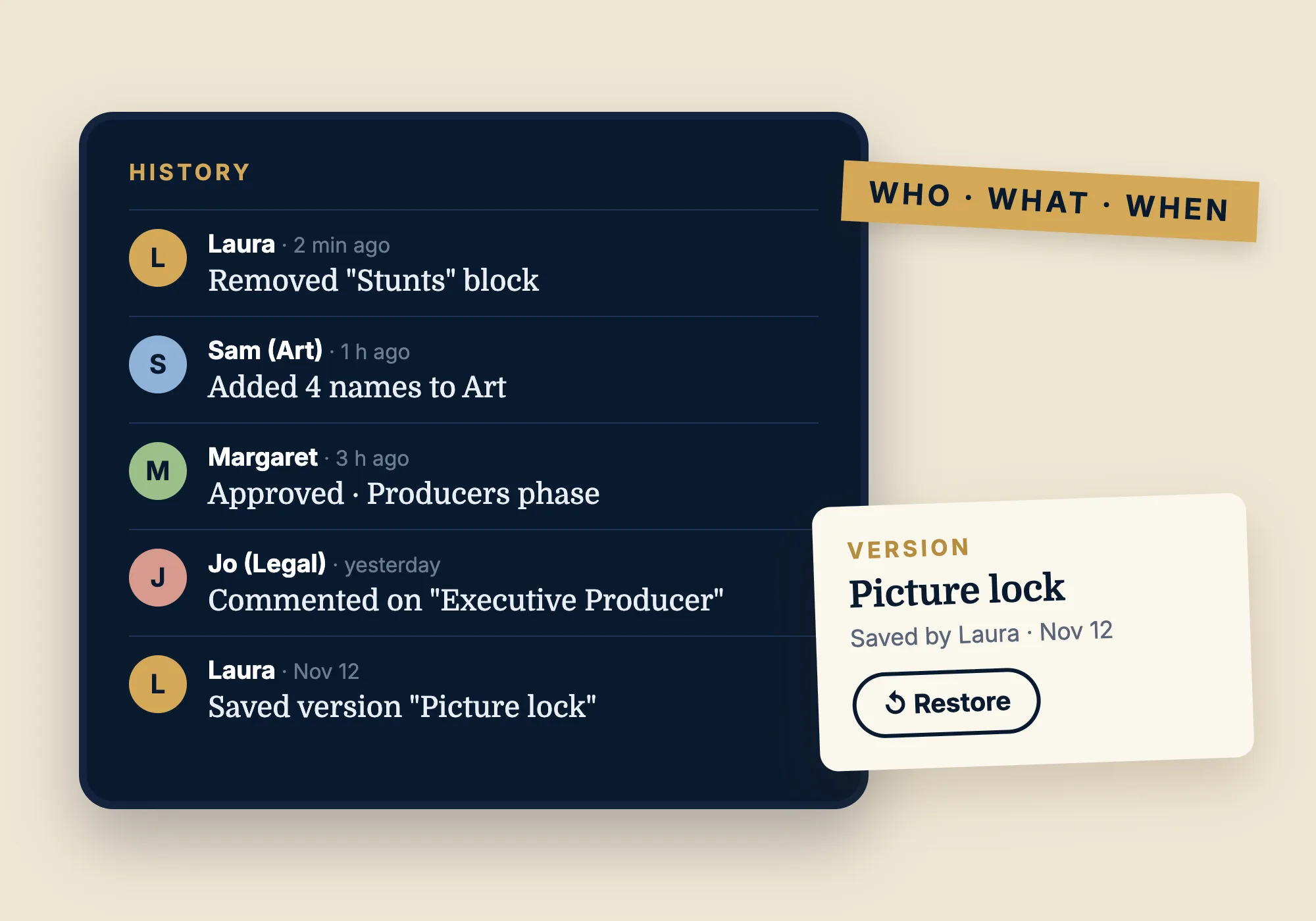
What Endcrawl can't do for you
Endcrawl turns a credits document into a render. The work around that document, collecting names from each department, checking them and signing them off, happens outside the tool. Based on Endcrawl's public website and help center (November 2026), these are the jobs it leaves to you.
Read a messy crew list in a minute
Paste an email or upload the Excel or Word file as it is: EndCredits.pro sorts it into cast, crew and departments while you wait.
With Endcrawl: the credits have to be in their Google Doc format; their team converts your list during a 24–48 hour setup.
Let each department fill in only its own crew
Send the Art department to its head through a private link. They see and edit that group only, with no account, and you accept what they send.
With Endcrawl: collaborators are added to the project or its Google Doc, the whole credits document.
Have every name verified
Someone who knows the crew marks each name Verified or flags it with a note, and you keep a record of who checked it and when.
With Endcrawl: no name-verification step is listed.
Run a sign-off in phases
Producers, then legal, then the distributor: the credits are locked during the review, each phase starts when the last one approves, and every decision is kept.
With Endcrawl: no approval workflow is listed.
Show the credits as you edit them
The preview plays your design live, every change on screen at once.
With Endcrawl: you see a change in a preview render, which they turn around in minutes.
Hand your editor a text or Excel export
Download the credits as TXT or Excel in screen order, for editors who build them in Premiere, Resolve, Avid or After Effects.
With Endcrawl: no text or spreadsheet export is listed.
Give every project transparency, cards and 4K
ProRes 4444 with alpha, scroll and card scenes, up to 4K DCI, on every project.
With Endcrawl: cards, alpha and 4K start at the Pro tier.
Credit a whole TV episode, however long
No limit on the length of the credits or the number of cards, episode after episode.
With Endcrawl: their Pro episodic tier allows up to 40 cards and 60 seconds of credits per episode.
How the workflow differs from Endcrawl
Endcrawl details come from its public website and help center, November 2026. "Not listed on their site" means we could not find it there.
| EndCredits.pro | Endcrawl | |
|---|---|---|
| Department heads add their own crew | Send a group of the credits to its head by email. They fill it in on a private page, with no account, and you accept or decline. | Not listed on their site. |
| Names checked by people who know the crew | A review request: the reviewer marks each line Verified or flags it with a note. Nothing changes until you accept. | Not listed on their site. |
| Approval workflow | Phases in order (producers, legal, distributor…). The credits are locked while they are reviewed, and every decision is kept. | Not listed on their site. |
| Comments | On the line or the name in the playing preview, pinned to that credit. Outside reviewers comment through a private link, with no account. | Google Doc comments, on the text of the document. |
| Getting your credits in | Excel, Word, CSV, text pasted from an email or a video of existing credits, in any structure. AI sorts it into cast, crew and departments in a minute, and you review it. | The credits have to be in their Google Doc format. Their team converts an Excel or Word list for you during setup (24–48 hours on Basic and Pro). |
| Who changed what, and when | A History of every change, saved versions, a compare view and one-click restore. | The Google Doc's own history. |
| Where the credits live | In the app: a spreadsheet-like table for the names and a live preview of the design. | A Google Doc synced with their web app. |
| Transparency, cards and 4K | On every project: ProRes 4444 with alpha, scroll and cards, up to 4K DCI. | From the Pro tier. |
Department heads add their own crew
EndCredits.pro
Send a group of the credits to its head by email. They fill it in on a private page, with no account, and you accept or decline.
Endcrawl
Not listed on their site.
Names checked by people who know the crew
EndCredits.pro
A review request: the reviewer marks each line Verified or flags it with a note. Nothing changes until you accept.
Endcrawl
Not listed on their site.
Approval workflow
EndCredits.pro
Phases in order (producers, legal, distributor…). The credits are locked while they are reviewed, and every decision is kept.
Endcrawl
Not listed on their site.
Comments
EndCredits.pro
On the line or the name in the playing preview, pinned to that credit. Outside reviewers comment through a private link, with no account.
Endcrawl
Google Doc comments, on the text of the document.
Getting your credits in
EndCredits.pro
Excel, Word, CSV, text pasted from an email or a video of existing credits, in any structure. AI sorts it into cast, crew and departments in a minute, and you review it.
Endcrawl
The credits have to be in their Google Doc format. Their team converts an Excel or Word list for you during setup (24–48 hours on Basic and Pro).
Who changed what, and when
EndCredits.pro
A History of every change, saved versions, a compare view and one-click restore.
Endcrawl
The Google Doc's own history.
Where the credits live
EndCredits.pro
In the app: a spreadsheet-like table for the names and a live preview of the design.
Endcrawl
A Google Doc synced with their web app.
Transparency, cards and 4K
EndCredits.pro
On every project: ProRes 4444 with alpha, scroll and cards, up to 4K DCI.
Endcrawl
From the Pro tier.
Everything else you need for the credits
- A first layout for you. Generate the composition from the list: key credits on cards, the rest in a crawl ordered by department.
- Live preview. Design scroll and card scenes, fonts, columns and timing, and see them play as you edit.
- Masters for any edit. MP4, ProRes 422 HQ or ProRes 4444 with transparency, up to 4K DCI, 23.976 to 60 fps.
- Export to your NLE. TXT or Excel in screen order, for editors who build the credits in Premiere, Resolve, Avid or After Effects.
- TV series. Every episode in one project; duplicate an episode to start the next. No limit on credits length.
- Set up with you. During the beta we onboard every production personally.
How to switch from Endcrawl
- 1
Copy your credits
Select the credits in your Endcrawl Google Doc (or your Excel or Word file) and copy them.
- 2
Import them
In EndCredits.pro, open Import credits and paste. Check the groups and lines it found, then import. If you only have a video of the credits, import the video instead.
- 3
Bring in your team
Invite your team, send each department its request, and set up the approval phases your production needs.
- 4
Design, approve and render
Generate a first layout, adjust it with the live preview, send it for sign-off and render the master for your edit.
Frequently asked questions
What is the best Endcrawl alternative for working with a team? +
EndCredits.pro is built for the team work around the credits: department heads fill in their own crew through a private link, reviewers check every name, approvers sign off phase by phase, and everyone comments on the exact line they mean. You design and render the credits in the same place.
Can people outside my team add or check names without an account? +
Yes. A collaboration request lets a department head add their crew to one group of the credits; a review request lets someone verify each name in a group. Both work through a private link sent by email, with no sign-up, and nothing reaches your credits until you accept it.
How do approvals work? +
You set up phases, for example producers, then legal, then the distributor. When you submit, the credits are locked and a version is saved. Each approver gets a private link, watches the credits play, comments and approves or rejects; when a phase is approved, the next one starts on its own.
Does Endcrawl have an approval workflow? +
Endcrawl's public website and help center list no approval workflow: the team works in a shared Google Doc, with Owner, Writer and Reader roles. In EndCredits.pro you set up approval phases (producers, then legal, then the distributor); the credits are locked while they are reviewed, each approver approves or rejects from a private link, and every decision is kept.
Can you import an Excel file into Endcrawl? +
Endcrawl's team imports your Excel or Word credits for you during setup, which takes 24–48 hours on its Basic and Pro tiers, and puts them into its Google Doc format. In EndCredits.pro you upload the file yourself, in any structure, and the import sorts it into cast, crew and departments in about a minute.
Is there a free version of Endcrawl? +
Endcrawl offers a free, untimed demo whose renders are low-resolution (1k) previews; full-resolution renders need a paid licence for each production. EndCredits.pro is free during its beta, full-resolution renders included.
Does Endcrawl use Google Docs? +
Yes. In Endcrawl the credits live in a Google Doc that is synced with its web app. In EndCredits.pro the credits live in the app itself, in a spreadsheet-like table with a live preview, so department requests, name reviews, comments and approvals all work on the same credits.
Can I move my credits from Endcrawl? +
Yes. Copy the credits from your Google Doc, or upload the Excel or Word file you started from: the import reads any structure and sorts the lines into cast, crew, music and text, and you check the result before anything is added. If you have a video of the credits, you can import that instead.
Can I render ProRes 4444 with a transparent background? +
Yes, on every project. Where the background is transparent, the ProRes 4444 file is transparent, so the credits sit over picture in your edit.
Does it work for TV series? +
Yes. A series project holds every episode, each with its own credits, and you can duplicate an episode to start the next one. There is no limit on the length of the credits.
How much does EndCredits.pro cost? +
It is free during the beta, with no credit card. Pricing will be announced before the beta ends.
Bring your whole team to the credits
EndCredits.pro is free during the beta, with no credit card. Pricing will be announced before the beta ends.
Sign up for free
Feedback on the exact line
Click a line or a name in the preview and comment on it: the note stays pinned to that credit, wherever it moves. Share a private review link with people outside the team and their comments land in the same place.
How comments and review links work →